 SBM LabsTCG
BGS slabs
Open an eBay listing of a Beckett (BGS) slab. Beckett doesn't publish scans, so SBM Labs TCG reads the label in the seller's photos and measures the card from them, then tells you whether the slab could cross to a PSA 10.
Open the listing
The panel opens on the right, tagged BGS slab. It reads Beckett's label off the listing's photos (the grade, the four subgrades and the serial number) and picks the best photo of the front and of the back to measure. The first time anyone checks a slab this takes a little longer than a scan, up to a minute. After that it's ready at once for everyone.
Could it be a PSA 10?
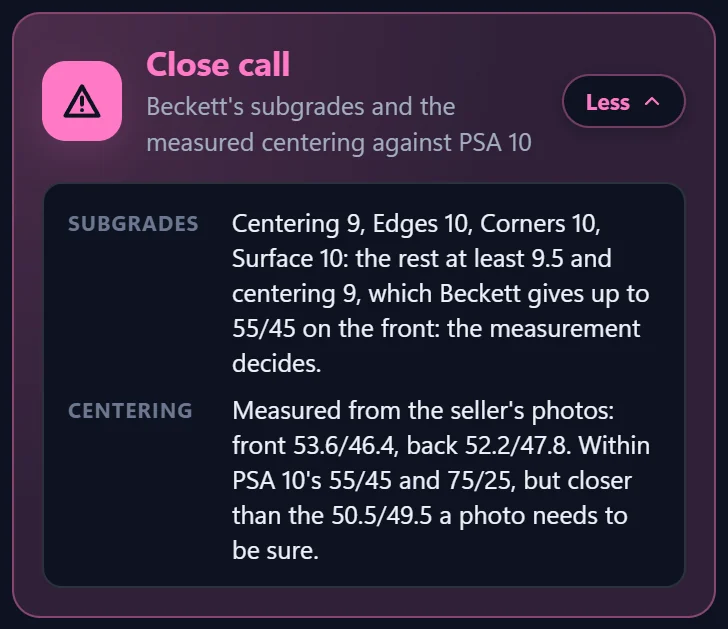
For a PSA 10, every subgrade needs to be 9.5 or better. Centering can be a 9, because Beckett gives a 9 to cards up to 55/45 on the front, which a PSA 10 allows too. So the measurement decides.
- PSA 10 candidate: the subgrades are there and the measured centering is well within PSA 10's limits.
- Close call: the subgrades are there, but the centering is close to PSA 10's 55/45 on the front or 75/25 on the back.
- Unlikely: a subgrade below 9.5 (centering below 9), or the centering over PSA 10's limits.
- No subgrades: see below.
Click Why for the reasons: what was read off the label, and how the centering measured.
Beckett's subgrades
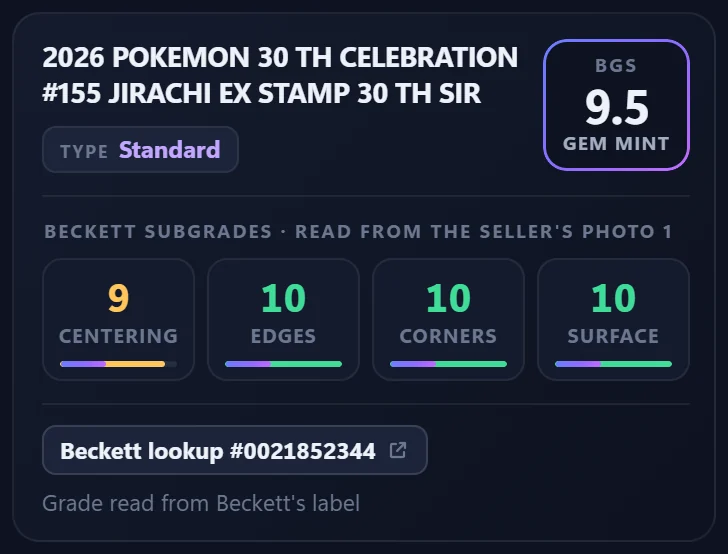
The card box shows the card as Beckett's label names it, the grade, and the four subgrades as tiles:
- Green: 9.5 or 10, what a PSA 10 needs.
- Amber: a centering 9, allowed if the card measures well.
- Red: below what a PSA 10 needs.
- –: not read surely. Point at it to see why.
Under the tiles, Beckett lookup opens Beckett's own page for the slab's serial number, so you can check the grades against Beckett's record.
When it can't read the label
Some BGS labels have no subgrades, and some photos are too small or have glare across the label. Then the panel says No subgrades, or Subgrades not all read with the ones it could read. The centering is still measured and shown.
A number it isn't sure of is left out, never guessed: a 9 misread as an 8 would be a different grade.
Spotted a subgrade read wrong? Click Feedback at the bottom of the panel and pick Subgrades read wrong, so we can put it right.